
What Is BYOK? Bring-Your-Own-Key AI Apps Explained
BYOK means using an AI app with your own provider API key and paying the provider directly. What it is, how the costs work, and the risks to manage.
- BYOK (bring your own key) means using an AI app with an API key you created at a model provider such as OpenAI, Anthropic or Google. The app sends your requests with that key, the provider bills your own account at its published per-token rates, and the app does not resell model access to you.
- The main benefits are price transparency, provider choice and paying only for what you use. The main costs are setup effort and the responsibility of protecting a key that can spend money.
- A BYOK bill is estimated from tokens: input tokens times the input rate plus output tokens times the output rate. The provider’s invoice is the final number.
BYOK, defined in one paragraph
BYOK stands for "bring your own key". In AI software it describes an app that does not sell you model access itself. Instead, you create an API key in your own account at a model provider — OpenAI for GPT models, Anthropic for Claude, Google for Gemini, or an aggregator such as OpenRouter — and paste that key into the app. Every request the app makes on your behalf is authenticated with your key, so the provider meters the usage against your account and bills you directly.
The term comes from cloud security, where "bring your own key" originally meant supplying your own encryption keys to a cloud service. In the AI app market it has taken on a narrower, commercial meaning: the key is an API credential, and bringing it means you, not the app, hold the billing relationship with the model provider.
That distinction is the whole point. A subscription chat app decides which models you get, how much you can use them and what you pay per month. A BYOK app is closer to an email client: it provides the interface, and the service behind it is one you signed up for separately.
How a BYOK app works, step by step
The mechanics are the same across almost every BYOK app, whether it runs in a browser, on a phone or on a laptop. The differences between apps are in the details: where the key is stored, which route the request takes to the provider, and how clearly the app shows you what each message costs.
- You create an account on the provider’s developer platform. This is separate from any consumer chat subscription you may already have.
- You add billing — usually prepaid credits or a card — and generate an API key.
- You paste the key into the BYOK app, which usually checks it by making a small request such as listing the models your key can use.
- When you send a message, the app builds an API request, attaches your key and sends it to the provider, either directly or through a pass-through endpoint.
- The provider returns the answer along with a count of the tokens used, and charges your account for those tokens.
| BYOK app | Subscription chat app | Credits-based platform | |
|---|---|---|---|
| Who you pay for model usage | The provider, directly | The app, as a flat monthly fee | The platform, in its own credits |
| How usage is priced | Provider’s published per-token rates | Bundled; limits set by the plan | Credit conversion set by the platform |
| Which models you can use | Any model your key can access | The models the plan includes | The models the platform offers |
| Cost when you use it lightly | Low; you pay per token | The full monthly fee | Depends on credit packs |
| Setup effort | Create an account and a key | Sign up and pay | Sign up and buy credits |
Why people choose BYOK
The advantages are mostly about control and transparency, and they compound when you use more than one provider.
Price transparency comes first. The provider publishes a rate per million tokens for each model, and that rate is what you pay. There is no second price list to decode and no credit exchange rate between you and the model. If the app shows an estimated cost per message, you can reconcile it against the provider’s usage dashboard.
Choice is the second. With keys for several providers you can use the model that suits the task — a fast inexpensive model for summarising, a stronger one for difficult reasoning — without paying for several overlapping subscriptions. When a provider releases a new model, it is usually available to your key right away rather than when the app decides to add it.
The third is proportional cost. Someone who asks a few questions a day pays for a few questions a day. For light and uneven use, that is often less than a flat monthly fee, although heavy daily use can reverse the comparison. The cost section below shows how to work it out rather than assume it.
The risks, and how to reduce them
An API key is a password with billing authority. Anyone who has it can make requests that you pay for, so the risks of BYOK are mostly about where the key lives and how much it can spend.
The first question to ask of any BYOK app is where the key is stored and which route requests take. Keeping keys on the device, in the platform’s secure storage, is the common pattern for native apps. Web apps differ: some send requests from the browser, some route them through a server endpoint to handle compatibility with provider APIs. Neither is automatically unsafe, but the app should say plainly which one it does and whether anything is retained.
The second is spend control. Provider consoles let you set spending limits, create separate keys per app and watch usage per key. Using those features turns a leaked key from an open-ended liability into a bounded one.
The third is a misunderstanding rather than a security issue: a consumer subscription is not API credit. ChatGPT Plus does not fund OpenAI API usage, and a Claude Pro plan does not include access to the Claude API. You need to add billing on the developer platform separately.
- Create a dedicated key for each app, so you can revoke one without breaking the others.
- Set a monthly spending limit or use prepaid credits without automatic reload while you learn your usage.
- Never paste a key into a chat, a support ticket or a shared document; if you do, revoke it and create a new one.
- Check the provider’s usage page after the first few days and compare it with the app’s estimates.
- Remember that rate limits and usage tiers belong to your provider account, not to the app.
How BYOK costs are calculated
Model providers charge per token, a chunk of text of roughly three-quarters of an English word. Each model has an input rate for the tokens you send and a higher output rate for the tokens it writes back, both quoted per million tokens. Some providers add lower rates for cached input that is reused across requests.
The estimated cost of one message is therefore: input tokens × input rate + output tokens × output rate. The input side includes more than your question — the app resends the conversation so far on every turn, because the API has no memory between requests, so long threads cost more per message than short ones.
A worked example. As of 28 September 2026, Anthropic lists Claude Sonnet 5 at $2 per million input tokens and $10 per million output tokens. A message that sends 2,000 input tokens and receives a 600-token answer costs an estimated 2,000 × $2 / 1,000,000 + 600 × $10 / 1,000,000 = $0.004 + $0.006 = $0.010, or about one cent. A hundred such messages cost about a dollar, estimated.
Treat any per-message figure as an estimate. Providers round, apply caching, count reasoning tokens as output and change prices. The invoice from your provider is the final figure; a good BYOK app helps you steer before the invoice arrives.
BYOK with an aggregator key
Not every key comes from the company that trained the model. Aggregators such as OpenRouter sell access to many providers’ models through a single account and a single key, and a BYOK app can use that key like any other.
The trade-off is an extra layer. An aggregator sets its own terms — fees on credit purchases, routing between hosts, and rate limits of its own, including separate limits for its free models — on top of the underlying model’s price. That is not a reason to avoid it; one key for dozens of vendors is convenient. It is a reason to read the aggregator’s published pricing and limits rather than assuming they match the model vendor’s.
How Oriveo implements BYOK
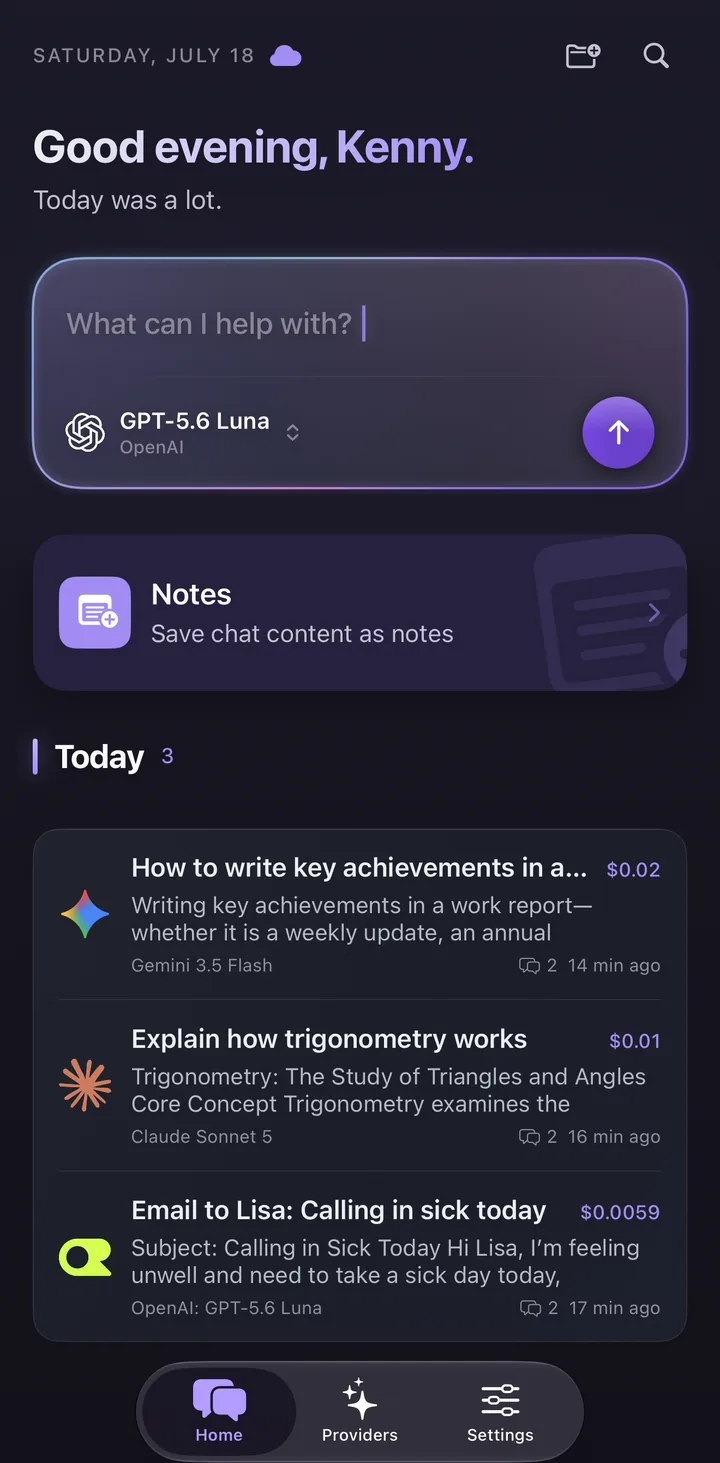
Oriveo is a BYOK multi-model chat app for iPhone, Android and the web. It connects to 15 official providers — including OpenAI, Anthropic, Google Gemini and OpenRouter — plus custom OpenAI-compatible endpoints through Relay, with 700+ models in one picker. With your own keys, each provider bills your account at its published price and Oriveo adds no markup.
Keys are kept on your device or in your browser rather than stored as account records. The native iPhone and Android apps send BYOK requests to the provider directly; the web app uses a real-time pass-through endpoint that does not retain the key or BYOK chat content. Every message shows an estimated cost at the provider’s list price, on every tier.
If you do not have a key yet, Oriveo Free lets you start with a short list of free models, without an API key and without signing in, and add your own keys later.
Is BYOK right for you?
BYOK suits people who use more than one model, who want to know what their usage costs, or whose usage is light or uneven. It suits developers who already have provider accounts, and increasingly non-developers who are willing to spend ten minutes creating a key.
It is a weaker fit if you want a single fixed monthly bill with no setup at all, or if you rely on features that only exist inside a provider’s own consumer app. Many people end up with both: a subscription for the app they live in, and BYOK for everything else.
Frequently Asked Questions
What does BYOK mean in AI apps?
Is BYOK cheaper than a subscription?
Is it safe to put my API key into an app?
Does my ChatGPT Plus or Claude Pro subscription work as an API key?
What is the difference between BYOK and a credits-based AI platform?
Can I use BYOK without being a developer?
Related reads
Bring your own keys, or start without one
Oriveo connects 15 official providers and 700+ models on iPhone, Android and the web, with an estimated cost on every message and no markup on provider usage.