
Multi-Model AI Client Comparison: 6 Clients in 2026
A multi-model AI client runs on your device; a platform runs in someone else’s tab. Six clients compared on platforms, keys, sync and cost visibility.
- A client is software you install and point at your own model providers. A platform is a service you log into that owns the provider relationship for you.
- The distinction decides where your chat history lives, who bills you, and what happens on a phone.
- Six clients compared, with the July 2026 verification date attached to every published figure and the open questions listed rather than papered over.
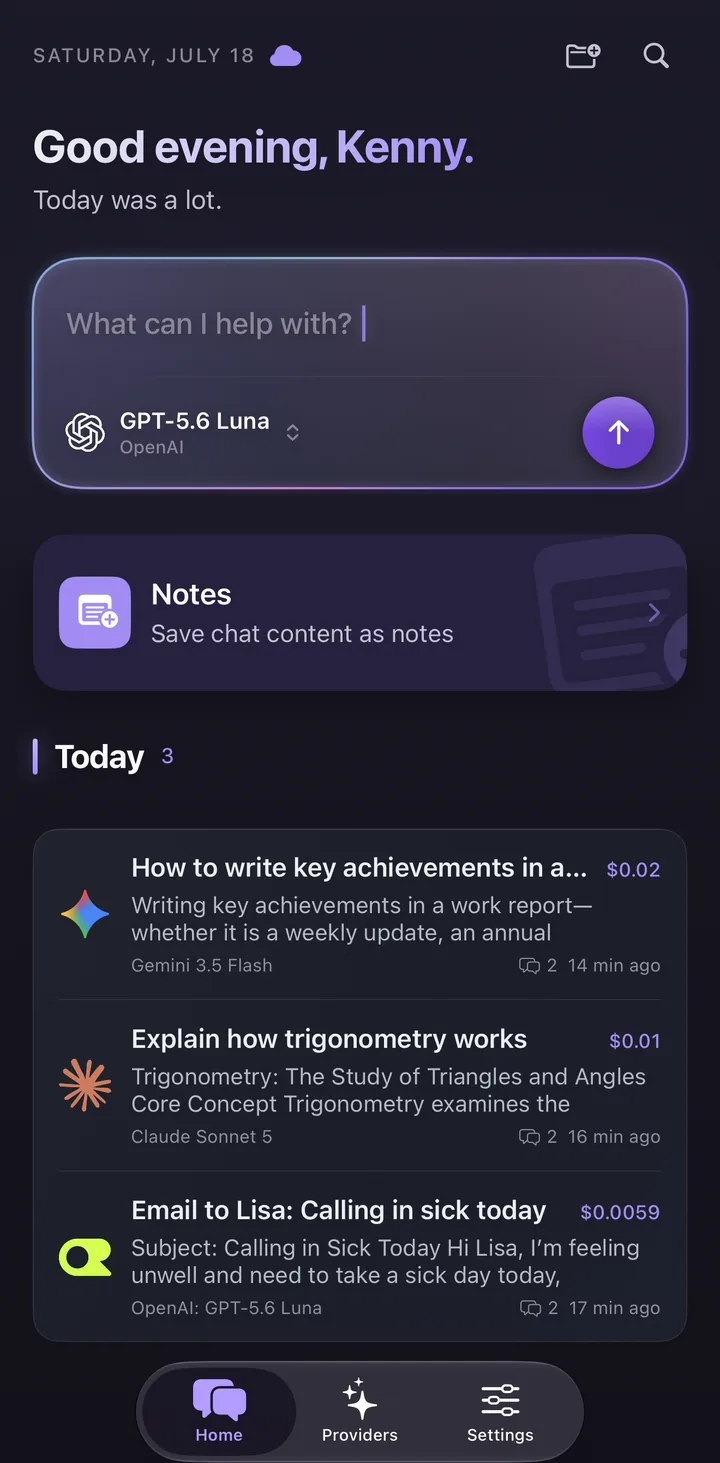
Client vs platform: why the distinction matters
Search results for “multi-model AI client” mix two different kinds of product, and the mixing is not accidental — several vendors are happy to be described as either. But the two shapes behave differently in ways that show up on day one, not in month six.
A client is software you run. You install it, you paste in API keys for the providers you want, and each provider bills your own account at its published list price. The vendor of the client is not in the payment path at all; they either give the software away, sell a licence, or sell a subscription for the software itself. Chat data starts on the device the software is running on.
A platform is a service you sign into. The vendor holds the accounts with each lab, resells that access as a subscription or as credits, and decides which models appear in the picker and what they cost in platform units. Your history lives on their servers, because that is the only place it can live.
Neither shape is better. They fail differently, and the failure modes are what you are really choosing between: a client makes you set up provider accounts before it is useful, and a platform makes you accept a conversion rate between its credits and the providers’ own prices.
| Question | Client | Platform |
|---|---|---|
| Where the software runs | On your machine or phone | On the vendor’s servers, reached through a browser or a thin app |
| Where chat history starts | In local storage on the device | In the vendor’s database, by design |
| Who bills you for model usage | Each provider, at its own list price | The vendor, in subscription fees or credits |
| What you need before the first message | An API key from at least one provider | An account, and usually a card |
| What happens if the vendor changes plans | Your keys and local history still work | Your access changes with their pricing page |
What a good multi-model client must do
Once you have decided you want a client rather than a platform, the shortlist criteria are surprisingly consistent. Feature lists differ enormously, but the things people actually complain about after a month are always the same six.
The last two are the ones nobody checks before installing, and the ones that cause the most regret. Sync determines whether a client is usable on more than one device, and per-message cost visibility determines whether you find out about an expensive habit now or at the end of the month.
- Provider breadth — how many labs it connects to directly, and whether it also accepts a custom OpenAI-compatible endpoint for anything not on the list.
- Model switching — whether you can change model inside a conversation, or have to start a new one.
- Attachments and working surface — images, documents, code files, web search, reusable presets, saved notes, if your work is more than plain chat.
- Key handling — where API keys are stored, and whether they leave the device.
- Sync — automatic across devices, manual export and import, or a self-hosted file protocol such as WebDAV.
- Cost visibility — whether the client tells you what a message cost while you are working, or leaves that to the provider’s billing dashboard.
How we checked
On 24 July 2026 we read the public pages for each product below: pricing pages, downloads pages, documentation, App Store and Google Play listings, and repository licence files where the project has one. Every price and platform claim carries that date, because at least three products in this space were showing promotional pricing that day and model catalogues move constantly.
This is a documentation comparison. We did not score answer quality, because answer quality belongs to the underlying models rather than to the client wrapped around them. Where a public page did not answer a question, the answer here is “not documented” — which is not the same as “not available”, and is written that way on purpose.
Oriveo is our own product, so treat its entry accordingly. We have kept it to claims you can check on our product facts page, and we have written down the thing it does not do alongside the things it does.
Oriveo — a client with two hosted routes attached
Oriveo is a bring-your-own-key client for web, iPhone and Android that also ships two hosted routes, which removes the usual first-run wall. You can start with no key at all, connect your own keys later, and keep the same history throughout.
BYOK covers 15 official providers — OpenAI, Anthropic (Claude), Google Gemini, xAI Grok, DeepSeek, Mistral, Qwen, Kimi, MiniMax, Z.ai, Groq, Together AI, Fireworks AI, OpenRouter and SiliconFlow — plus any OpenAI-compatible endpoint you add as a custom relay, which is how self-hosted and gateway setups get in. That is 700+ models in one picker, and you can switch model in the middle of a conversation. Each provider bills your own account directly at its list price, with no markup added on top.
Oriveo Free is the no-sign-in route: a daily quota on a curated set of free-tier models routed through OpenRouter, with no account and no card. Oriveo AI is a separate paid hosted service that shows up as a built-in provider and draws down a prepaid AI Balance; signed-in accounts get 3 included requests each week, and anything past that is charged at each model’s official list price rather than at a platform credit rate.
Chats are stored on the device first, and cross-device sync for chats and notes is optional and part of the paid plans. Oriveo connects to hosted provider APIs and does not run models on your device.
- Platforms: web, plus native iPhone and Android apps, localised into 16 languages.
- Pricing (as of 24 July 2026): the app is free to use; Pro is $9.99 a month or $59.99 a year; Lifetime is $149.99 once. Paid plans add cross-device sync with 20 GB of storage, Usage Insights broken down by provider, budget alerts, and unlimited Skills, folders and pinned chats, and include no AI usage or model credits.
- Working surface: notes that record which model said something and which chat it came from, with folders, tags, full-text search and Markdown export; a Memory you write once and can read, edit, delete or switch off per chat; reusable Skills that can each search their own knowledge base; streaming answers, reasoning display, web search and image generation.
- Cost: every message carries an estimated cost, calculated from the provider’s published token pricing and the tokens actually used once the answer finishes. It is an estimate for steering your spending, and the provider’s invoice is the final word.
- What to know: model switching is sequential. Oriveo does not present two answers to the same prompt at once, and never sends one prompt to several models simultaneously. Cross-check is the sequential alternative — it re-runs an answer you already have through one second model you choose and shows the original and the second opinion together for comparison — and it needs a provider connected with your own API key, so it is not available on the Oriveo Free tier.
Chatbox AI — the widest free footprint
Chatbox is the client with the fewest barriers between installing it and sending a message with your own key. The apps are free on web, Windows, macOS and Linux, and there are native apps in both mobile stores. Bringing your own key is part of the free tier rather than an upgrade, and there is also a trial allowance that refreshes daily for people who have not connected a provider yet.
Its community edition is published under GPLv3 with 41,117 GitHub stars, alongside a separate proprietary pro build, so “open source” describes part of the product rather than the whole of it. Paid plans, quoted per month on annual billing at $3.5 for Lite, $16.7 for Pro and $33.33 for Pro+ as of 24 July 2026, add a hosted compute-point service on top.
One thing stayed unresolved. The App Store listing mentions cross-device sync, while the site’s own machine-readable index and FAQ emphasise keeping app data on the user’s device. Those two statements point in different directions and we could not settle the question from public pages, so it is recorded here as open rather than answered.
Cherry Studio — the free workstation
Cherry Studio is a free desktop client under AGPL-3.0 with 48.9k GitHub stars, and it is the densest feature set on this list at no cost. The site states support for 300+ models, bringing your own key is the core mode, and split-pane comparison is part of the product rather than a paid tier. The English site is at cherry-ai.com.
What you give up is reach. There is no browser version and nothing published in either mobile store, and there is no account-based automatic sync: history moves between machines through WebDAV or local backup files, which you configure yourself. If you work at one desk that is a fair trade. If your reading happens on a phone and your writing happens on a laptop, it is the thing that will annoy you.
Jan — the local-model end of the spectrum
Jan sits at the end of the range where the models themselves also live on your machine. Jan’s official site describes an open-source desktop application for Windows, macOS and Linux that can run open-source models locally or connect to remote AI APIs such as GPT and Claude, which makes it the natural pick when the requirement is inference that never leaves the building.
It is included here for completeness rather than for a like-for-like pricing row: Jan was not part of the July 2026 pricing pass behind the other five entries, so no plan names or figures are quoted for it. If local inference is a hard requirement, Jan and Cherry Studio are the two products on this page most worth reading about directly.
Msty — the split-chat specialist
Msty’s headline feature is Split Chats, described in its own words as running multiple models side by side, and that is the reason to choose it. If your workflow is putting one question to two or three models and reading the answers together, this is the product built around that habit.
It is desktop-first: Windows, macOS and Linux builds, with browser access bundled into the Aurum plan rather than sold separately, and nothing in either mobile store. Its pricing mixes two commercial models and is easy to quote wrongly — as of 24 July 2026, Aurum is an annual subscription at $149 per user per year, Aurum Lifetime is a one-time purchase at $349, and Teams is $300 per user per year with a five-seat minimum. Bringing your own key is supported, with Azure and Bedrock connections reserved for Aurum. There is a free desktop plan described as limited, and public pages did not say whether Split Chats is part of it.
LobeHub — a client and a platform in the same product
LobeHub blurs the line this article started with, deliberately. It is a self-hostable, source-available project with desktop builds for Windows, macOS and Linux, and it is also a hosted platform with four subscription tiers. Its free plan already includes bringing your own key and Global Cloud Sync, which is unusual among hosted platforms, and it ships mobile apps: an iOS app first released on 22 March 2026, at version 1.0.13 with 13 ratings when we checked, plus an Android app. Its mobile clients are not part of the published source, so we make no claim about how they are built.
The licence needs precision. The project is source-available under the LobeHub Community License, described as Apache-2.0 with additional conditions, and GitHub reports the repository licence field as NOASSERTION against 80,748 stars. Calling it plain Apache-2.0 or MIT would misdescribe it.
On the hosted side, pricing as of 24 July 2026 runs Free $0, Starter $12.9 a month or $118.8 a year, Premium $24.9 a month or $238.8 a year, and Ultimate $49.9 a month or $478.8 a year. The free plan carries 500,000 credits a month, and the pricing page marks Claude Sonnet 5, GPT-5.6 Sol and GPT-5.5 as not supported on it — so the free credits cover a lot of the catalogue but not the top of it.
Mobile is where the shortlist thins out
This is the single biggest practical split in the client category, and it is worth stating plainly rather than implying it. Not every client publishes a phone app, and several of the best desktop clients publish none at all.
The honest summary as of 24 July 2026 is below. Note the middle case in particular: a progressive web app on a phone is real and often good, but it is not the same as an app installed from a store, and TypingMind’s own documentation is explicit that this is what it offers.
- Apps in both stores: Chatbox AI, LobeHub and Oriveo. LobeHub’s iOS app arrived on 22 March 2026; Chatbox publishes on the App Store and Google Play; Oriveo ships native iPhone and Android apps alongside its web app.
- Progressive web app, no store listing: TypingMind, whose documentation states there is no native iOS or Android app.
- Desktop only: Cherry Studio, Msty and Jan publish builds for Windows, macOS and Linux with nothing in either mobile store. Msty includes browser access in its Aurum plan.
- The follow-on question is sync. A phone app is only useful if the conversation you started on a laptop is on it, which is why the sync column in the table below matters as much as the platform column.
Cost visibility: the feature nobody advertises
Every client on this page can spend your money. Very few pages talk about how you find out how much. With bring-your-own-key setups the bill lands in each provider’s own dashboard, usually a day late, aggregated across everything else you did with that key — including work that has nothing to do with the client.
That gap matters most for the things people do without thinking. Long conversations resend their whole history with every turn, so a thread’s cost per message rises as it grows. Attachments and long system prompts are counted as input tokens like anything else. Reasoning-heavy models charge for tokens you never see. None of this is hidden by the providers — it is all in their price lists — but it is invisible at the moment you press send, which is the only moment where it would change your behaviour.
In Oriveo this is handled per message: an estimated cost is attached to every reply, calculated from the provider’s published token pricing and the tokens actually used once the answer finishes, at every tier including the free one. It is an estimate for steering your spending, and the provider’s invoice is the final word. Provider-level breakdowns, monthly trends and budget alerts belong to the paid plans; the per-message estimate itself does not.
For the rest of the clients here, our July 2026 pass covered pricing, platforms, key handling, licences and sync — it did not extend to auditing whether each one displays a per-message cost. So no claim is made either way about them, and if this is your deciding feature, check it in each app before you commit.
At a glance
Six clients, read from public pages on 24 July 2026. Blank-looking cells are deliberate: where a vendor does not publish an answer, this table says so rather than guessing at one.
| Client | Platforms | BYOK | Sync as documented | Licence | Free tier |
|---|---|---|---|---|---|
| Oriveo | Web, iPhone, Android | Every plan | Cloud sync for chats and notes, 20 GB, on paid plans | AGPL-3.0 community edition plus a proprietary official app | Daily quota with no sign-in |
| Chatbox AI | Web, Win/macOS/Linux, iOS, Android | Included at no cost | Public statements conflict | GPLv3 community edition plus a proprietary pro build | Apps free, plus a daily allowance |
| Cherry Studio | Windows, macOS, Linux | Core mode | WebDAV or local backup files | AGPL-3.0 | The whole client |
| Jan | Windows, macOS and Linux, per its official site | Own keys, plus local models | Not covered by this check | Open source | Outside this comparison |
| Msty | Windows, macOS, Linux; web on Aurum | Supported; Azure and Bedrock on Aurum | Not published | Commercial | Limited desktop plan |
| LobeHub | Web, Win/macOS/Linux, iOS, Android | From the free plan up | Global Cloud Sync, from the free plan | Source-available, LobeHub Community License | 500,000 credits a month |
Which client fits which person
Reading the table row by row is less useful than reading it against your own constraints. Four constraints decide almost every case.
If none of these describe you, the honest advice is to install two of the free ones and keep the one you still have open in a fortnight. Nothing in this category is expensive enough to be worth a month of deliberation.
- You work on one desktop and want to pay nothing: Cherry Studio, and Jan if local inference matters. Both are free, both are open source, and both expect you to arrange your own backup.
- You want the same conversation on a laptop and a phone: Chatbox AI, LobeHub and Oriveo are the ones with apps in both stores. Then check sync — a phone app without sync is a second, separate history.
- You compare two models on the same question constantly: Msty built its product around Split Chats, and Cherry Studio and LobeHub both offer a split view. Oriveo works sequentially instead, so it is not the pick for that habit.
- You have not got an API key yet and do not want to start there: Oriveo Free needs no account and no key, LobeHub’s free plan carries a monthly credit pool, and Chatbox gives you a daily trial allowance on top of its free apps.
- You want to know what it costs as you go: check this one inside each app before committing, because it is the criterion least likely to be documented on a pricing page.
What we could not verify
Listing the gaps is part of the comparison. Each item below was looked for on public pages on 24 July 2026 and not found; none of them means the capability is absent.
If one of these is your deciding factor, ask the vendor before paying. That is faster and more reliable than any comparison article, this one included.
- Whether Chatbox AI provides account-based automatic sync, and whether it offers a split-pane comparison view.
- Whether Msty’s Split Chats is available on its free desktop plan.
- Official model counts for LobeHub, Msty and TypingMind, none of which publish one.
- In-app purchase prices in the App Store and Google Play, which are regionally redirected and were not readable for any product here.
- Jan’s current plans, platform details and feature set beyond what its official site states, which were outside this pass.
Frequently Asked Questions
What is a multi-model AI client?
Is a client better than a platform for multi-model AI?
Which multi-model AI clients have native mobile apps?
Do multi-model AI clients sync between devices?
Can a multi-model client answer the same prompt with two models at once?
Do I need an API key to use a multi-model AI client?
Related reads
Try a multi-model client on every device you own
Open Oriveo in the browser or install the iPhone or Android app to reach 700+ models from 15 official providers, with an estimated cost on every message.